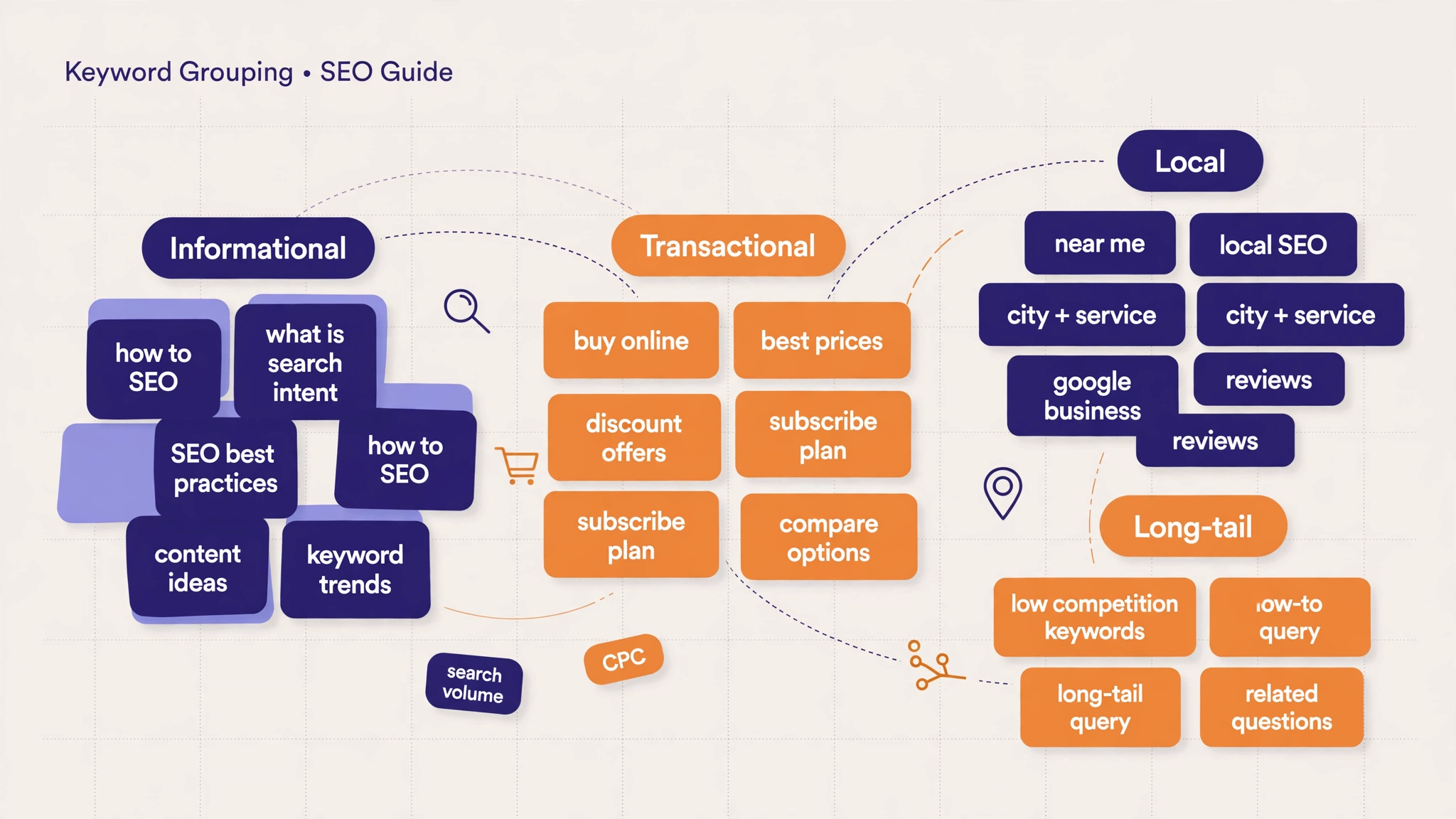
If you have a list of 500 keywords and no idea which ones belong on the same page, you have a grouping problem. Keyword grouping is the step that turns a messy keyword list into a clear content plan. Instead of targeting one keyword per page and hoping for the best, you organize similar keywords into groups, and each group gets one page that covers the whole topic.
In this guide, you will learn what keyword grouping is, how it differs from keyword clustering, and a simple step-by-step method to group keywords for your own website, even if you are doing it by hand in a spreadsheet.
What Is Keyword Grouping?
Keyword grouping is the process of organizing keywords that share the same topic or search intent into small groups. Each group represents one page on your website. For example, the keywords “keyword density checker”, “check keyword density online”, and “free keyword density tool” all belong in one group, because a person searching any of them wants the same thing: a tool that checks keyword density.
Grouping happens after keyword research and before writing. It answers the question every content plan needs: which keywords go together on one page, and which ones deserve their own page?
A good group has three qualities. First, the keywords share one clear topic. Second, they share the same search intent, so the same page can satisfy all of them. Third, the group is focused enough that one page can cover it properly, usually 5 to 20 closely related keywords.
Keyword Grouping vs Keyword Clustering
Keyword grouping and keyword clustering are closely related, and the two terms are often used for the same idea. The difference is mostly one of method. Grouping is usually the manual, practical job of sorting keywords into groups for your content plan. Clustering often means the automated version, where a tool compares search results and groups keywords that return similar pages.
For most small websites, the result is the same either way: a set of keyword groups, one per page. If you already understand clustering, grouping will feel familiar. The rest of this guide focuses on the practical method, the one you can do today with a spreadsheet and a free tool.
Why Keyword Grouping Matters for SEO
Grouping matters because Google ranks pages, not keywords. A page that covers a whole group of related keywords is usually stronger than a page built around a single keyword. Here is what grouping gives you.
One page, one topic. When all the keywords on a page point at the same topic, Google understands the page faster and ranks it for more of those keywords. This is the same idea behind choosing a single focus keyword for each page, applied to a whole group.
No cannibalization. Without groups, two pages often end up targeting the same keywords and competing with each other. Grouping forces a decision: this keyword belongs to this page, and only this page. That is how you avoid the keyword cannibalization problem before it starts.
Better content planning. A group list is a content calendar. Every group without a page is a page you still need to write. Every group with a page is a page you can improve. You stop guessing what to write next.
Stronger internal linking. Pages in the same group link naturally to each other, because they cover related subtopics. That helps visitors find more of your content and helps Google understand how your site is organized.
How to Group Keywords Step by Step
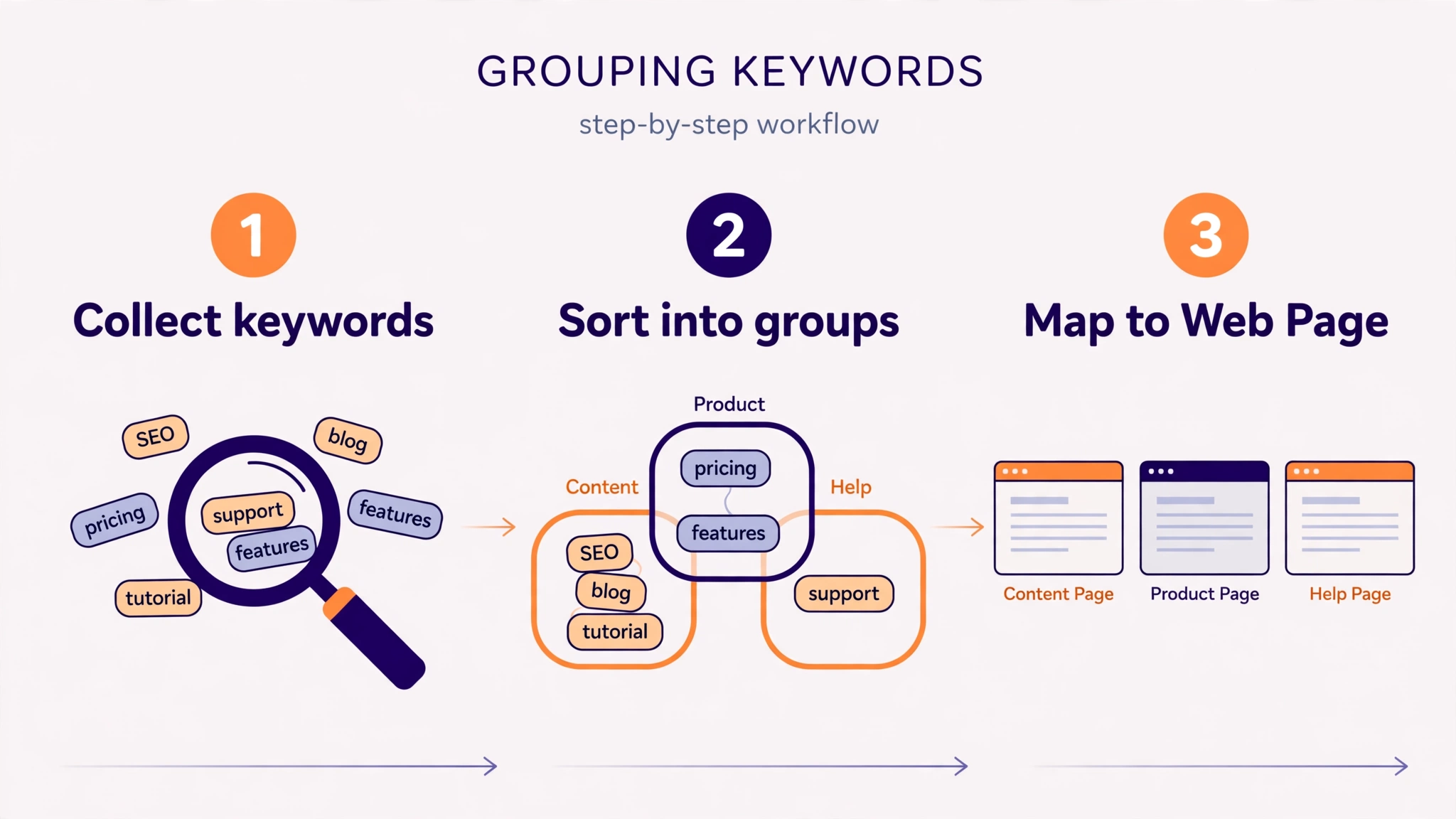
You do not need an expensive tool to group keywords. This six-step method works with a spreadsheet and any keyword list, from 50 keywords to 5,000.
Step 1: Collect all your keywords
Start with one master list. Pull keywords from your research, from Google Search Console, and from your competitors’ pages. Put them in a single spreadsheet, one keyword per row, with search volume in the next column if you have it. Remove exact duplicates first.
Step 2: Remove irrelevant keywords
Delete keywords that do not fit your website. If you run a keyword tool site, “keyword density checker” belongs on the list, but “keyword density checker jobs” does not. A clean list groups faster and gives cleaner groups.
Step 3: Group by search intent
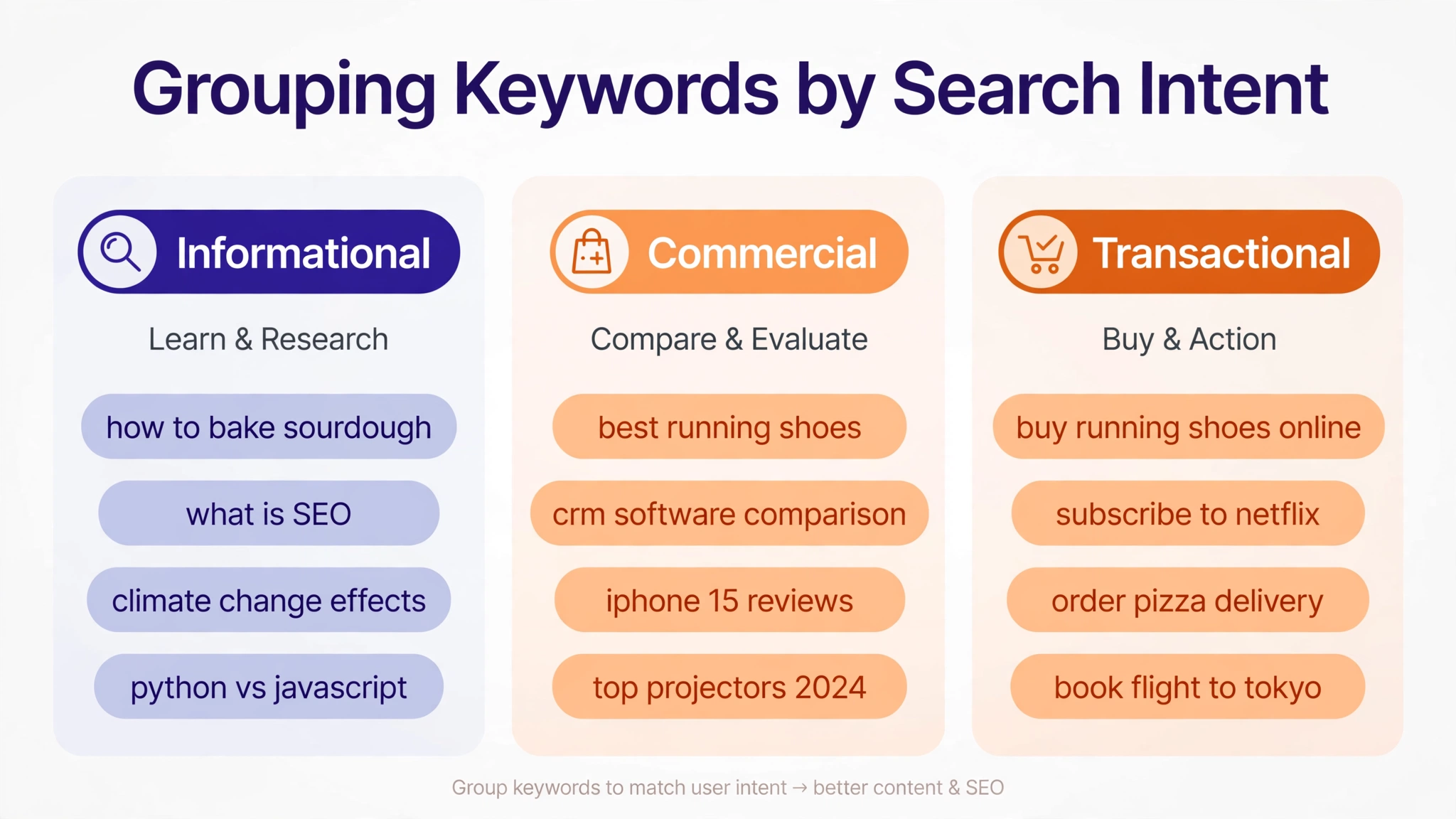
Sort keywords by what the searcher wants. There are four common intents: informational (learn something), navigational (find a specific site), commercial (compare options), and transactional (buy or use something now). “What is keyword density” is informational. “Best keyword density checker” is commercial. “Keyword density checker free” is transactional. Keywords with different intents usually belong on different pages, even when the words look similar.
Step 4: Group by topic and meaning
Inside each intent, group keywords that mean the same thing or cover the same subtopic. “Count keyword frequency”, “keyword frequency counter”, and “how many times a keyword appears” are one group. Use the search results as a check: if two keywords show mostly the same pages on Google, they belong together. If the results are completely different, split them.
Step 5: Name each group and pick a main keyword
Give every group a short name, like “keyword density basics” or “free density tools”. Then pick one main keyword for the group, usually the one with the highest search volume that still matches the topic. This main keyword becomes the focus of the page you will build for the group.
Step 6: Map each group to a page
Write the target page next to each group. If the page already exists, the group tells you which keywords that page should cover. If it does not exist, the group is a new page to write. A simple keyword mapping sheet keeps this organized: group name, main keyword, supporting keywords, target page, and status.
Methods to Group Keywords
There is more than one way to group keywords. The right method depends on how many keywords you have and how much time you can spend.
| Method | Best for | How it works |
|---|---|---|
| Manual grouping | Under 200 keywords | You read the list and sort keywords by topic and intent in a spreadsheet. Slow, but you learn your topic deeply. |
| Spreadsheet sorting | 200 to 1,000 keywords | Sort alphabetically, filter by common words, and use find and replace to tag groups. Faster than pure manual work. |
| SERP-based grouping | Any size | Compare the top search results for two keywords. If the results overlap heavily, the keywords belong in one group. |
| Tool-based clustering | Over 1,000 keywords | A clustering tool groups keywords automatically by SERP similarity and gives you ready-made groups to review. |
For most small sites, manual grouping plus a SERP check is enough. Tools help at scale, but they still need a human review, because no tool understands your business as well as you do.
Common Keyword Grouping Mistakes to Avoid
Grouping is simple, but a few mistakes show up again and again. Avoid these and your groups will be far more useful.
Making groups too big. A group with 50 keywords is not a group, it is a topic. Split it until each group fits one page. If a page would need to cover three different things to satisfy its keywords, the group is too big.
Mixing search intents. “What is keyword density” and “keyword density checker free” look related, but one searcher wants to learn and the other wants a tool. One page cannot serve both well. Keep intents separate.
Putting every keyword on its own page. The opposite mistake is just as bad. One page per keyword creates thin pages that compete with each other. Group first, then decide which groups deserve pages.
Forgetting to check the results. Always check what Google actually shows for a keyword before grouping it. Two keywords that look similar can have very different results, which means Google treats them as different topics.
Never updating groups. Search demand changes. Review your groups every few months, add new keywords, and merge groups that have started to overlap.
Keyword Grouping Example
Here is a small example for a keyword tool website. Three groups, three pages, no overlap.
| Group | Main keyword | Supporting keywords | Target page |
|---|---|---|---|
| Density basics | what is keyword density | keyword density definition, keyword density meaning, ideal keyword density | What Is Keyword Density guide |
| Density tools | keyword density checker | check keyword density online, free keyword density tool, keyword density checker online | Word Density Checker tool page |
| Frequency counting | keyword frequency counter | count keyword frequency, how many times a keyword appears, word frequency counter | Keyword Frequency Counter guide |
Notice how each group has one clear intent and one page. The density basics group is informational, the tools group is transactional, and the frequency group covers a specific counting task. Nothing overlaps, so no two pages compete.
How to Use Keyword Groups on Your Site
Grouping only helps if you use the groups. Start with the group that has the most search volume and the clearest intent, and build or improve its page first. Place the main keyword in the title, the first paragraph, and a heading. Then use the supporting keywords naturally in the body text, in subheadings, and in image alt text.

After publishing, check the page with a keyword frequency counter to confirm your main keyword appears a sensible number of times, and use a word density checker to make sure no keyword is overused. Then link the page to other pages in related groups, so visitors and search engines can move between them. When you place keywords on the page, follow the same keyword placement rules you would use for any page: title, headings, first paragraph, and naturally through the text.
Finally, track each group in Search Console. When a group starts ranking, you will see its keywords climb together, because the page serves the whole group, not just one keyword.
Frequently Asked Questions
What is keyword grouping in SEO?
Keyword grouping is organizing keywords that share the same topic or search intent into small groups, so each group can be targeted by one page on your website. It turns a long keyword list into a clear content plan.
Is keyword grouping the same as keyword clustering?
Almost. Grouping is usually the manual job of sorting keywords into groups, while clustering often means a tool does the sorting automatically by comparing search results. The result is the same: keyword groups, one per page.
How many keywords should be in one group?
Most groups work well with 5 to 20 closely related keywords. Fewer than 5 usually means the group is too narrow, and more than 20 usually means it should be split into two groups.
Can one keyword belong to two groups?
No. Each keyword should belong to exactly one group and one page. If a keyword fits two groups, pick the group where it fits best, or split the groups more clearly.
Do I need a tool to group keywords?
No. You can group keywords by hand in a spreadsheet by sorting them by topic and search intent, and checking the search results for similar keywords. Tools help when you have thousands of keywords, but they are not required.
Conclusion
Keyword grouping is the bridge between keyword research and content that ranks. Collect your keywords, remove the irrelevant ones, group by intent and topic, and map each group to one page. Start with your biggest group, build its page properly, and let the groups guide what you write next. Your keyword list will stop being a pile of words and start being a plan.