What Is a Keyword Cannibalization Fix?
A keyword cannibalization fix is the set of steps you take when two or more pages on your own website try to rank for the same search. Instead of working together, these pages compete, and search engines have to guess which one is best. Sometimes they pick the weaker page, sometimes they switch between pages, and sometimes neither page does well. A keyword cannibalization fix removes this confusion by giving each page its own job. It is not hard, and you do not need expensive tools. All you need is a list of your pages, a little patience, and a clear plan, which this guide explains in simple words from start to finish.
What Keyword Cannibalization Means
The word sounds scary, but the idea is simple. Cannibalization means your pages are eating each other’s chances. Imagine you run a small shop and you put two sales people at the same counter, both saying almost the same thing to every customer. They would get in each other’s way. A website works in the same way. If you write three articles that all aim for the same phrase and the same reader need, your own pages stand in each other’s way. Search engines want one clear answer for each search, so they prefer a site that shows a clear page for each topic.
Why Cannibalization Hurts Your Site
When several pages target the same phrase, their strength is split. Links, clicks, and attention are spread across many pages instead of gathering on one strong page. The page that shows up in search results may not be the one you want, such as an old post instead of your best guide. Readers may land on a weak page and leave. Your site may also look messy, as if you repeat yourself. Over time, this slows down growth. The result is not always a disaster, but it often means pages that could be in a better position remain stuck in the middle of the results.
Signs You Need a Keyword Cannibalization Fix
There are a few clear signs. You may see two of your pages swapping places in search results for the same phrase, one week the first page and the next week the second. You may notice that a page you did not expect shows up for your main keyword. Your pages may have almost the same title, the same headings, or the same topic with slightly different words. Rankings may stay low even though you wrote a lot of content. If you see any of these signs, you probably need a keyword cannibalization fix. Do not panic, because many sites have this problem, and most of it can be solved calmly.
How to Find Competing Pages
Finding the problem is easier than most people think. Open Google Search Console, go to the performance report, and choose a search phrase. Then look at the pages tab. If more than one page of your site gets impressions for that same phrase, they may be competing. You can also search Google using the word “site:” followed by your domain and your keyword, and check which pages appear. A simple spreadsheet helps too. List every page, its main keyword, and its purpose. When you sort by keyword, duplicates stand out. This step is the first part of any keyword cannibalization fix, because you cannot repair what you have not found.
Keyword Cannibalization Fix Step by Step
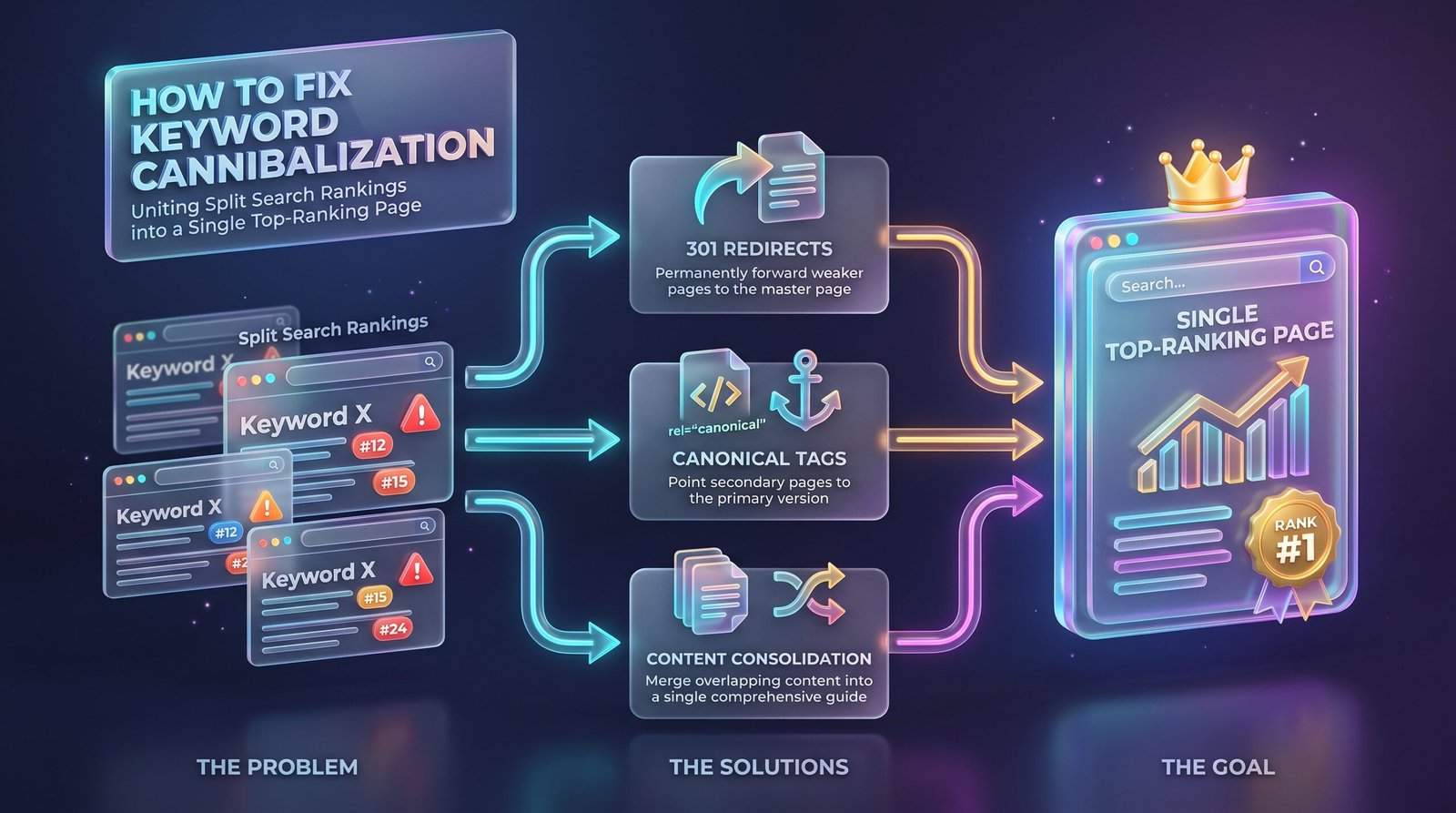
Here is the plan in simple order. First, make a list of the pages that target the same phrase. Second, check what each page really offers and what the reader wants. Third, decide which page is the strongest, based on content quality, links, and traffic. Fourth, choose the right action for the others: merge, change the focus, redirect, or add a canonical tag. Fifth, update your internal links. Sixth, wait and watch the results. Following this keyword cannibalization fix in order keeps you calm, and it prevents rushed changes that could break good pages or lose traffic that you already have.
Keyword Cannibalization Fix Option One: Merge Pages
Merging is often the best choice when two pages cover the same topic and neither is complete alone. Take the strongest page as the base. Copy the useful parts from the weaker page, such as extra tips, examples, or questions, and add them in a smooth way. Do not just paste text. Rewrite so the final page reads as one clear guide. Then redirect the old page to the new one using a permanent redirect, so visitors and search engines follow the move. This keyword cannibalization fix creates one stronger page, and it often gives the best long-term result because all the value gathers in a single place.
Keyword Cannibalization Fix Option Two: Change the Focus
Sometimes two pages are really about different things, and only the wording makes them look the same. In that case, give each page its own focus. Change the main keyword, the title, the first paragraph, and the headings of one page to match a different need. For example, one page may target “how to check keyword density” and the other may target “keyword density formula.” This keyword cannibalization fix keeps both pages and gives each a clear purpose. Remove the repeated phrase from the page you are changing, and write for a different intent, such as a guide, a list, or a tool page.
Keyword Cannibalization Fix Option Three: Redirect
If an old page has little value but still gets some visits, a redirect can help. A permanent redirect sends visitors and search engines from the old address to the better page. Choose the destination carefully. It should be the page that best matches the same need, not just your home page. Also update links on your own site so they point straight to the new page. This keyword cannibalization fix is clean and safe when done right, but avoid redirecting to unrelated pages, because that can confuse readers. Keep a short note of every redirect you make so you can check them later.
Keyword Cannibalization Fix Option Four: Use Canonical Tags
A canonical tag tells search engines which version of a page you prefer when two pages are very similar. It is useful when you must keep both pages live, for example when a page has several versions for different reasons. Add the tag on the weaker page and point it to the main page. Remember that it is a strong hint but not a command, so search engines may still decide differently. This keyword cannibalization fix works best for near-duplicate pages and not for pages that have different content and different intent. In that case, merging or changing the focus is usually a better path.
Fixing Internal Links and Anchor Text
Your own links send signals about which page matters. If many links on your site use the same anchor text for different pages, you add to the confusion. Review the links that point to the competing pages. Point the main phrase to the page you want to rank, and use other wording for the other pages. Add links from supporting articles to your best page, with clear, natural anchor text. This small step strengthens any keyword cannibalization fix, because it tells search engines which page you consider the main one. Also remove old links that point to pages you have merged or removed.
Keyword Cannibalization Fix for Blogs and Shops
Blogs often have the problem because writers publish many posts on similar ideas over the years. The best answer is to review old posts, merge the similar ones, and keep one strong guide for each topic. Online shops face a different case, where many product pages share the same words, or category pages compete with product pages. A keyword cannibalization fix for shops usually means making each page unique, with its own descriptions, and using category pages for broad phrases while product pages target specific ones. In both cases, remember that a clear structure helps readers find what they need faster.
How Long Results Take
Do not expect instant changes. After you merge, redirect, or update pages, search engines need time to find the changes and process them. This can take a few weeks, and sometimes a few months. Keep checking Search Console, and look for signs like one page gaining impressions while the others lose them. Avoid making more changes too early, because that makes it hard to see what worked. No one can promise a certain result or a certain date. If you did the keyword cannibalization fix carefully, the structure of your site is now cleaner, and that is a good base for steady growth.
Preventing Cannibalization in the Future
Prevention is easier than repair. Keep a keyword map, which is a simple sheet that shows each page and its main keyword. Before writing a new article, check the sheet to see if the topic already exists. If it does, update the old page instead of writing a new one. Think about search intent as well, because two pages with different intent can live together peacefully. Review the sheet every few months. A simple habit like this means you will rarely need a big keyword cannibalization fix again, and your site will stay tidy as it grows.
Common Mistakes in a Keyword Cannibalization Fix
The first mistake is deleting pages without redirects, which wastes links and traffic. The second is merging pages that have different intent, which makes the result confusing. The third is redirecting everything to the home page. The fourth is changing many things at once and then not knowing what worked. The fifth is forgetting to update internal links. The sixth is assuming that every pair of similar pages is a problem, because sometimes two pages can rank together without trouble. A careful keyword cannibalization fix starts with checking real data and ends with a calm review, not with fast panic changes.
Frequently Asked Questions About Keyword Cannibalization Fix
People often ask if cannibalization always hurts. Not always, because sometimes two pages from the same site both rank well, but it is worth checking if results swing. Others ask if they should delete the weaker page. Usually merging and redirecting is safer than deleting. Many ask how many pages per keyword are allowed. One main page is the clearest plan. Some ask which tool they need. Search Console and a spreadsheet are enough. A good keyword cannibalization fix is mostly about planning. If you feel unsure, start with one pair of pages, finish the keyword cannibalization fix, and watch what happens before moving to the next pair.