Introduction
Building a successful website is not only about publishing high-quality articles. It is also important to connect your pages in a clear and useful way. Internal links help visitors move from one page to another without leaving your website. They also help search engines discover your content and understand how different pages are related. This is why internal linking for SEO is an important part of a strong website strategy. Whether you run a blog, an online store, or an SEO tools website, a good internal linking structure can make your website easier to explore and manage. In this guide, you will learn how internal links work, how to create them, and how to avoid common mistakes.
2. What Is Internal Linking in SEO?
Internal linking means adding hyperlinks that connect one page of your website to another page on the same website. For example, if you write an article about keyword research and link to another article about keyword density, that is an internal link. These links allow visitors to discover related information and help search engines find different pages on your website. Internal linking for SEO is useful because it creates connections between your content and makes your website structure easier to understand.
3. How Do Internal Links Work?
Internal links work by connecting a clickable word, phrase, image, or button to another page on the same domain. When a visitor clicks the link, the browser opens the destination page. Search engine crawlers can also follow many internal links to discover website content. These connections help search engines understand which pages are related and how visitors can move through your website. A well-organized internal linking structure makes important content easier to find.
4. Why Is Internal Linking Important for SEO?
Internal linking is important because it improves website navigation, supports content discovery, and helps search engines understand the relationship between pages. It can also guide visitors toward useful resources instead of allowing them to reach a dead end after reading one article. For example, a beginner reading about SEO basics may want to learn about keyword research next. A relevant internal link makes that next step simple. Internal linking for SEO supports a better experience for visitors while helping search engines explore your website.
5. Main Benefits of Internal Linking
A good internal linking strategy offers several benefits. It helps visitors discover more content, connects related topics, and makes important pages easier to reach. It can also help search engines identify your website’s structure and find pages through links. Internal links provide paths through your content, making it easier to build a useful information system. However, links should always have a clear purpose. Adding unnecessary links simply to increase their number will not create a better website.
6. Internal Links vs External Links
Internal links connect pages within the same website, while external links point to pages on other websites. For example, linking your keyword counter article to your keyword density guide is an internal link. Linking to an official search engine guide on another domain is an external link. Both types can be useful, but they serve different purposes. Internal linking for SEO helps organize your own website, while external links can provide additional information and trusted references.
7. What Is Anchor Text in Internal Linking?
Anchor text is the visible, clickable text used in a hyperlink. It tells visitors what they can expect after clicking a link. For example, the phrase “learn more about keyword research” can link to a related article. Descriptive anchor text is generally more helpful than vague phrases such as “click here.” Choose words that accurately describe the destination and fit naturally into the sentence. Avoid repeating the same keyword unnaturally across every internal link.
8. How to Create an Effective Internal Linking Strategy
Start by identifying the main topics covered on your website. Group related articles together and decide which pages should connect to each other. For example, a website about SEO tools might have separate guides about keyword counting, keyword density, content analysis, and image optimization. Connect these pages where the information is relevant. A strong internal linking for SEO strategy should help readers move naturally from one useful topic to another.
9. Link to Relevant Pages
Relevance is one of the most important parts of internal linking. A link should lead to a page that supports or expands the information in the current article. If you are writing about image optimization, linking to a guide about alt text makes sense. Linking to an unrelated topic may confuse visitors and interrupt their reading experience. Before adding a link, ask yourself whether the destination genuinely helps someone understand the subject better.
10. Use Natural and Descriptive Anchor Text
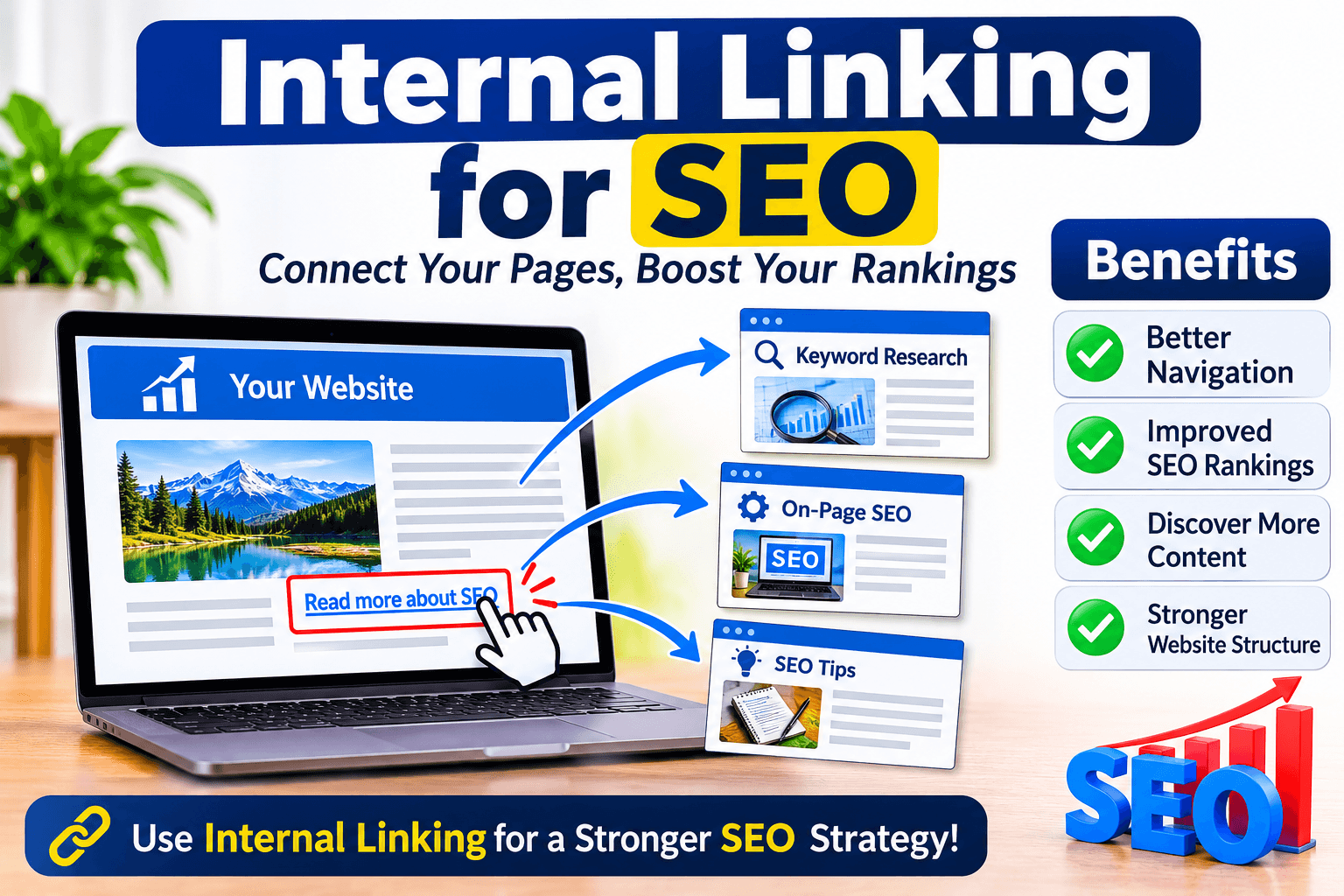
Good anchor text explains the destination without sounding forced. Instead of using “click here,” you can write “read our guide to keyword placement.” This gives readers a clearer idea of what the linked page contains. Natural anchor text also makes paragraphs easier to read. When working on internal linking for SEO, avoid keyword stuffing and make sure the clickable words accurately match the destination page.
11. Build Topic Clusters with Internal Links
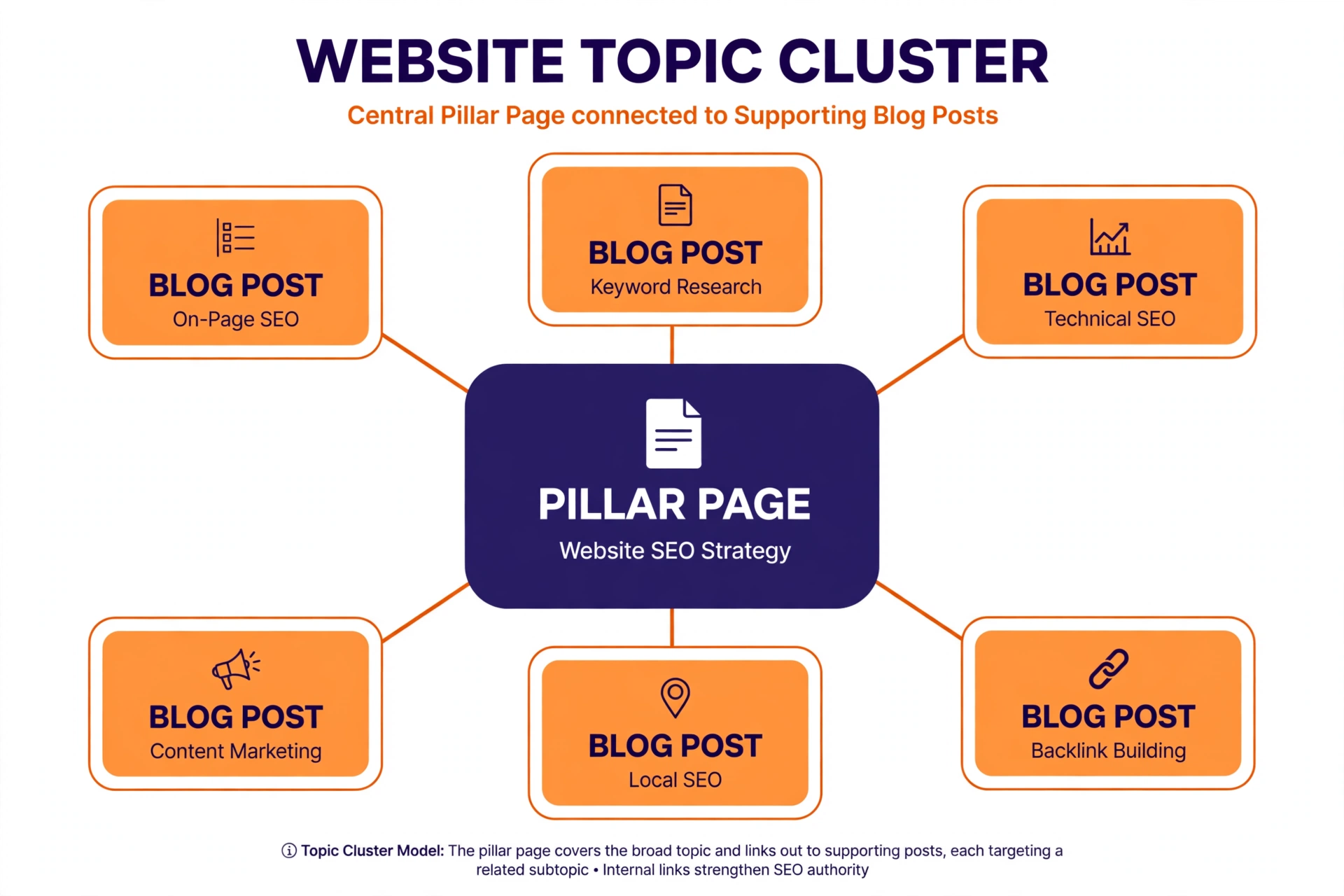
A topic cluster is a group of related articles connected through internal links. Usually, one main page covers a broad subject, while supporting articles explain smaller topics in more detail. For example, a main SEO guide could link to articles about keyword research, anchor text, alt text, internal links, and content optimization. These connections help visitors explore a subject in greater depth and create a clear structure for your website.
12. Understand Pillar Pages and Supporting Content
A pillar page is a detailed page that covers a broad topic. Supporting content focuses on smaller subjects related to that main topic. For example, a complete SEO guide could act as a pillar page, while separate articles explain keyword density, image SEO, and link building. Connect the supporting pages to the pillar page and link between them when useful. This creates a logical structure that helps visitors find related information.
13. Link Important Pages from Your Homepage
Your homepage is often one of the most frequently visited pages on a website. It can help visitors discover important sections, tools, and resources. Add clear links to your main categories and valuable pages where appropriate. Avoid placing every article directly on the homepage because this can create clutter. Instead, use a simple structure that guides visitors toward the most useful parts of your website.
14. Avoid Orphan Pages
An orphan page is a webpage that has no internal links pointing to it from other pages on your website. Such pages may be difficult for visitors and search engine crawlers to discover through normal website navigation. Review your articles and make sure important pages receive relevant internal links. Adding a link from a related article, category page, or resource section can help connect an orphan page to the rest of your website.
15. How Many Internal Links Should You Use?
There is no fixed number of internal links that every article must contain. The right number depends on the length of the content, its subject, and how many relevant pages are available. A short article may need only a few links, while a detailed guide may naturally contain more. Focus on usefulness rather than following an artificial target. Every internal link should provide value and make it easier for visitors to explore related information.
16. Use Breadcrumb Navigation
Breadcrumbs show visitors where they are within your website structure. For example, a page might display Home, SEO Guides, and Internal Linking. This allows users to move back to broader sections without starting from the homepage. Breadcrumbs can also help search engines understand how pages are organized. They are especially useful for websites with many categories, articles, and product pages.
17. Internal Linking for Blog Posts
Blog posts often cover related subjects, making them excellent opportunities for internal links. When writing a new article, review your existing content and identify pages that provide additional information. For example, an article about anchor text could link to a guide about backlinks and another article about internal linking. You should also update older posts when publishing new related content. This keeps your website connected as your content library grows.
18. Internal Linking for WordPress Websites
WordPress makes internal linking simple. Open a post or page in the WordPress editor, select the words you want to turn into a link, and click the link option. Search for the title of your existing page or paste its URL. Select the correct destination and save or update the post. Review the published page afterward to confirm that the link works correctly. You do not need a complicated plugin to create basic internal links.
19. Common Internal Linking Mistakes to Avoid
Some website owners add too many links to a single paragraph, use unclear anchor text, or link to unrelated pages. Others forget to update broken links after changing a page URL. Another mistake is leaving important articles without any links pointing to them. These problems can make website navigation confusing. A successful internal linking for SEO strategy focuses on relevant destinations, clear descriptions, working URLs, and a logical website structure.
20. How to Find Internal Linking Opportunities
Start by reviewing your existing articles and listing their main topics. Search your website for pages that discuss related subjects. For example, if you publish an article about keyword density, look for other pages about keyword counting, keyword placement, and content analysis. Add links only where they make sense in the surrounding text. You can also use website crawling tools to identify pages with few internal links or pages that need further review.
21. How to Audit Your Internal Links
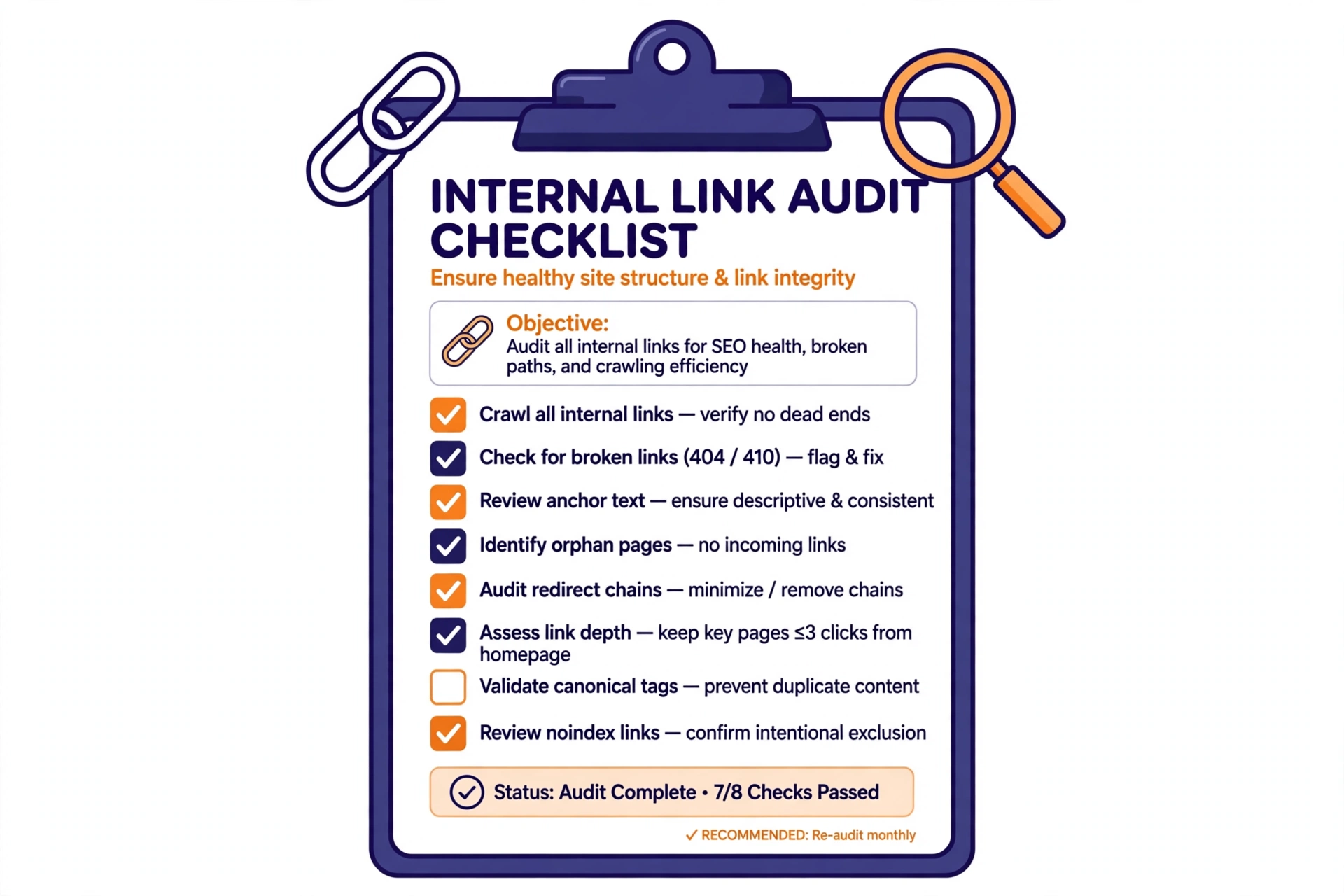
An internal link audit helps you understand how pages are connected. Check for broken links, redirect chains, orphan pages, and important pages that are difficult to reach. Review anchor text to make sure it describes the destination accurately. You can use an SEO crawling tool to collect internal link information across your website. Regular audits are useful when your website publishes new articles or changes its page structure.
22. Internal Linking and User Experience
Good internal links make a website easier to use. Visitors can move from one article to another, find answers to related questions, and discover helpful resources. For example, someone reading a guide about keyword research may want to use a keyword counter tool. A clear link can take that person directly to the relevant resource. This creates a more helpful experience and makes your website feel organized.
23. Best Practices for Internal Linking in SEO
Use descriptive anchor text, link to relevant pages, and keep your website structure simple. Make sure important pages are easy to discover and avoid leaving valuable articles disconnected. Review links regularly and fix broken destinations. Add links naturally as part of useful sentences instead of inserting them only for SEO. These habits make internal linking for SEO more effective and help create a website that visitors can understand.
24. Frequently Asked Questions About Internal Linking
What is internal linking in SEO?
Internal linking is the process of connecting one page of a website to another page on the same website.
Why is internal linking important?
It improves navigation, helps visitors discover related content, and gives search engines paths to find and understand website pages.
How many internal links should an article have?
There is no universal number. Use as many as genuinely help readers, while keeping the article easy to read.
Can internal links improve SEO?
Yes. Helpful internal links support content discovery and website structure. However, they do not guarantee higher search rankings.
What is the difference between internal and external links?
Internal links connect pages on the same website. External links connect your website to pages on other websites.
What is an orphan page?
An orphan page is a page that has no internal links pointing to it from other pages on the website.
Should I use keywords in internal link anchor text?
Use relevant keywords when they naturally describe the destination. Avoid forcing keywords into every link.
25. Conclusion
Internal linking is an important part of building a well-organized website. It helps visitors discover related content, supports search engine crawling, and creates clear connections between pages. By using descriptive anchor text, building topic clusters, fixing broken links, and connecting important articles, you can improve your website structure over time. Focus on relevance and user experience rather than adding links without a purpose.