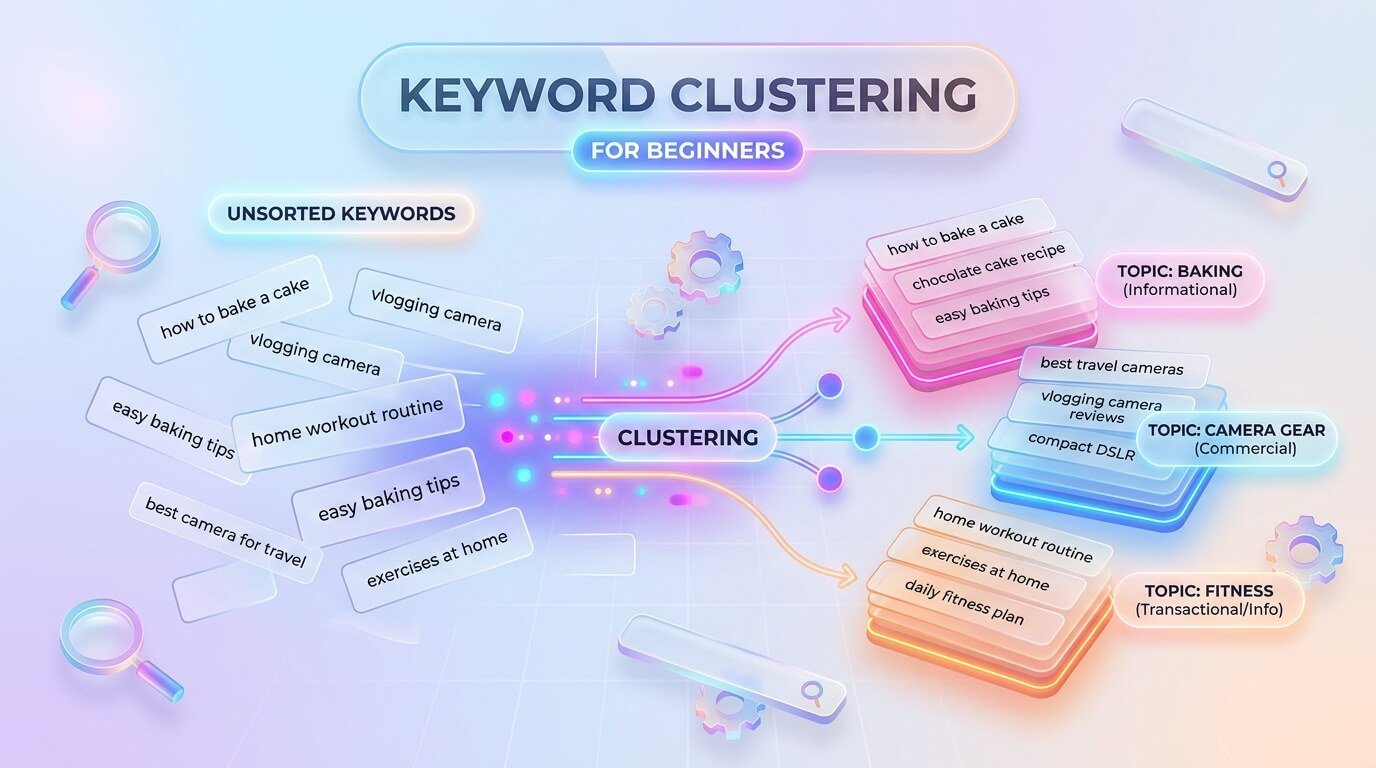
What Is Keyword Clustering for Beginners?
Keyword clustering is the habit of putting related search phrases into groups, so that each group can be handled by one page. Keyword clustering for beginners starts with a very simple idea: many phrases that look different are really asking for the same thing. For example, “how to reduce noise in a recording,” “remove background noise from audio,” and “clean noisy voice recordings” all want the same kind of answer.
Writing three separate pages for them would waste time and confuse search engines. Keyword clustering for beginners shows you how to spot these groups, pick one page for each, and build a site that feels clear and organized instead of messy and repeated.
Why Grouping Keywords Matters
A long list of keywords can feel like a pile of loose papers. You do not know where to begin, which phrase is more important, or which ones belong together. Grouping solves this by turning the pile into a small set of clear topics. Each topic becomes a page, and each page has one main phrase plus a few close helpers.
This saves writing time, because you stop creating pages that repeat each other. It also helps readers, because a single page can answer many small questions at once instead of sending them from page to page. A tidy plan always leads to better pages, and better pages lead to better results over time.
Keyword Clustering for Beginners vs Single Keyword Pages
Many new site owners write one page for every phrase they find. It looks organized, but it creates a problem: several pages compete for the same readers, and none of them becomes strong. When you compare that old habit with keyword clustering for beginners, the difference is clear.
A cluster page covers a topic in depth, and it can rank for the main phrase and many smaller phrases together. It also gets more value from every link and every visit. A site built around keyword clustering for beginners usually has fewer pages, but each page is stronger, longer, and more helpful, which is exactly what both search engines and readers prefer.
How Search Engines See Related Phrases
Search engines are good at understanding that different words can mean the same thing. When someone types a phrase, the engine looks for pages that answer the need, not only pages that repeat the exact words. That is why one good page can appear for many related searches.
You can learn a lot by searching two phrases and comparing the results. If the first page results look almost the same, the phrases likely belong in one cluster. If the results look very different, the phrases need separate pages. This simple test is one of the most trusted ways to check a group, and it needs no special software.
Keyword Clustering for Beginners Step by Step
The process is easy to follow, and you can finish a small project in one afternoon. First, collect all your keywords in one sheet. Second, check the search intent of each phrase. Third, group the phrases by topic and by the results Google shows. Fourth, choose one main keyword for each group and list the others as helpers.
Fifth, plan one page for each group. Follow these steps for keyword clustering for beginners, and do not worry if your first try is not perfect. Every project teaches you something, and you can always move a phrase to a different group later when you learn more.
Step One: Collect Your Keywords
Start by building a plain list. Use search suggestions, the “people also ask” box, Google Search Console, and the questions your readers or customers send you. Copy every phrase into one column of a spreadsheet, even if some look weak. Remove only the ones that have nothing to do with your topic, and remove exact duplicates.
If you can, add the search volume next to each phrase, but do not worry if you do not have numbers. A list of fifty to a hundred phrases is enough to practice with. Too many phrases at once can make a beginner feel lost, so start small and grow later.
Step Two: Check Search Intent
Before you group anything, ask what the person wants. Some phrases want to learn, some want to compare options, and some want to buy. Mixing these on one page is a common reason for poor results. A phrase like “how to record a podcast” wants a guide, but “best podcast microphone” wants a comparison.
Search each phrase and look at the type of pages that appear. Write a short note next to the phrase, such as guide, list, or product. These notes help you avoid grouping phrases that look alike but serve different needs, and they make the next step much easier to complete.
Step Three: Group by Topic
Now sort your list. Put phrases with the same topic and the same intent in the same group. A group can have a main phrase and three to ten smaller phrases. Give each group a short name, like “reduce audio noise” or “choose a microphone.” If a phrase fits two groups, ask which intent is stronger and put it there.
Use colors in your spreadsheet to make groups easy to see. If you are unsure whether two phrases belong together, compare their search results. If many of the same pages show up for both, put them together, and if not, keep them apart.
Pick a Main Keyword for Each Cluster
Every group needs one leader. Choose the phrase that best describes the topic, has a fair number of searches, and fits your site. The main keyword goes in the title, the first paragraph, and a heading. The other phrases in the group become helpers, and you can use them in subheadings and in the text where they fit naturally.
Do not choose a main phrase only because it has the largest number. Pick the one that matches what the reader wants and what you can write best, because a well-matched page usually beats a badly matched page that targets a bigger phrase.
Keyword Clustering for Beginners: A Simple Example
Imagine your site is about home podcasting. Your list has “best microphone for podcasting,” “podcast mic for beginners,” “which mic should I buy for a podcast,” and “microphone for recording voice at home.” All four want a comparison of microphones, so they form one cluster, and “best microphone for podcasting” becomes the main phrase.
Another group might hold “how to edit a podcast” and “podcast editing steps,” which want a guide. This small example of keyword clustering for beginners shows how eight messy phrases turn into two clear pages, each with a plain purpose.
Using Free Tools and Spreadsheets
You do not need expensive software to start. A free spreadsheet is enough, with columns for the phrase, the intent, the group name, and the page that will target it. Search suggestions and Search Console give you the raw phrases at no cost. Some paid tools can group phrases automatically by comparing search results,
and these can save time on very big lists, but they are not required for a small site. Plans and features change often, so check current details before buying. Automatic groups can also be wrong, so review them with your own eyes and fix anything that does not make sense.
How Clusters Shape Your Blog Structure
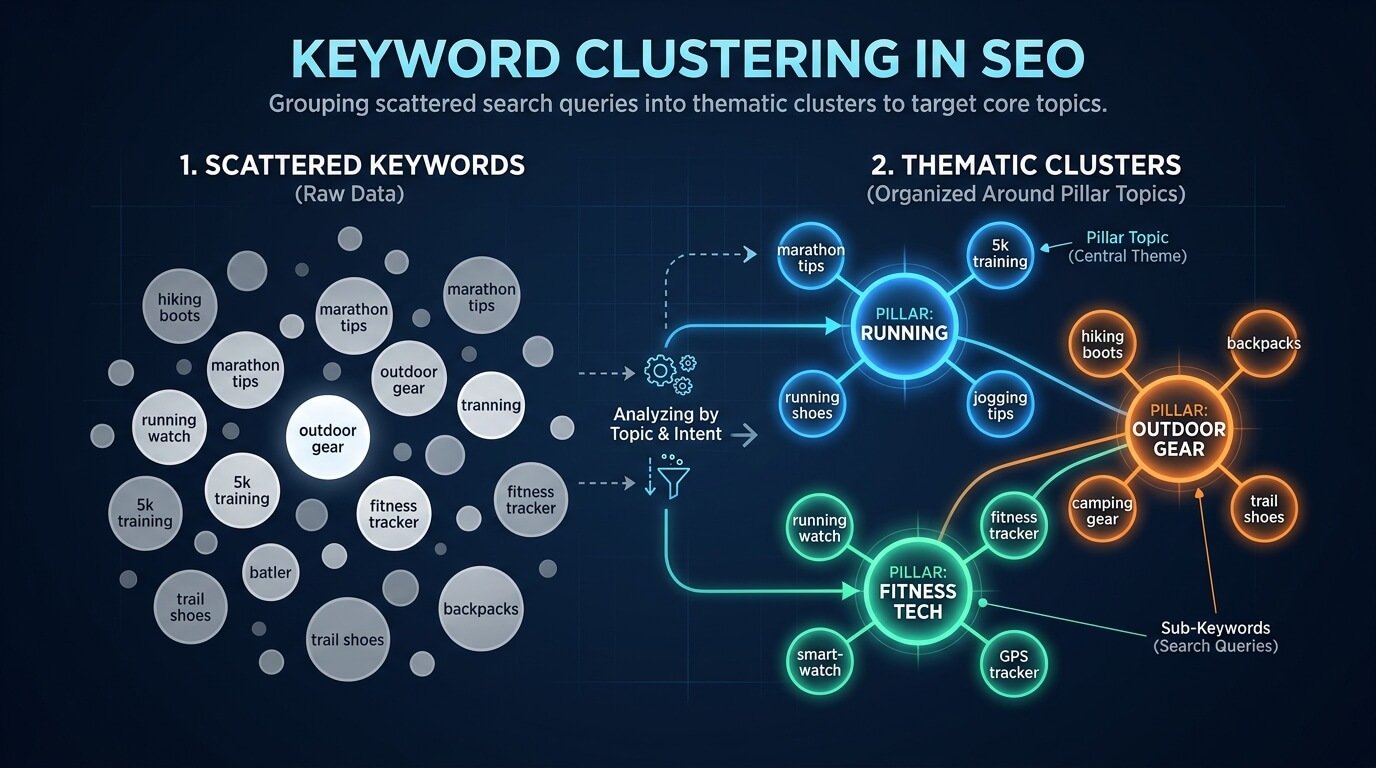
Once your clusters are ready, they become the skeleton of your site. A large cluster can be a main page, with smaller clusters acting as supporting articles around it. For example, a main guide about podcast recording can connect to smaller posts about microphones, noise, and editing.
Visitors enjoy this setup because they can move from one question to the next without getting lost. Search engines also see that you cover the topic with care. Planning your site this way makes every new article feel like a natural part of something bigger, instead of a random post with no connection.
Keyword Clustering for Beginners and Internal Links
Clusters work best when pages are linked to each other. Link each supporting article to the main page of its cluster, and link the main page back to the supporting articles. Use clear anchor text, which means the clickable words should describe the page they lead to. Do not use the exact same anchor on every link
Keyword clustering for beginners becomes far more powerful when you add these links, because the links show relationships between pages. They also help readers find more help and stay longer on your site. A small group of linked pages is a strong sign that your site knows the topic well.
Common Mistakes in Keyword Clustering for Beginners
The first mistake is grouping only by similar words and ignoring intent. The second is making clusters too big, so a single page tries to answer ten different needs. The third is making them too small, which creates many thin pages. The fourth is using the same main keyword for two pages.
The fifth is trusting automatic tools without checking the results. A sixth mistake is forgetting to update clusters when search results change. Most errors in keyword clustering for beginners come from rushing, so slow down, compare search results, and ask a simple question each time: would one page answer all of these?
How Often Should You Update Clusters?
Search results change, and so do the words people use. A review every three to six months is usually enough for a small site. Look at Search Console to see which phrases bring visitors and whether a page is getting traffic from words you did not plan for. Add new phrases to the right cluster, and split a cluster if it has grown too wide.
If two pages have started to compete, merge them. Keep your spreadsheet fresh with small changes instead of one huge cleanup. A little regular care keeps your plan accurate and saves you from big repair jobs later on.
Frequently Asked Questions About Keyword Clustering for Beginners
People often ask how many phrases a cluster should have. Three to ten is a practical range, but the right number depends on the topic. Others ask if they need paid tools. You do not, since a sheet and a few searches are enough for most small sites. Many ask how long it takes to see results. It can take weeks or months, and nobody can promise a ranking.
Some ask if they should redo old pages. Yes, if they overlap. A clear plan for keyword clustering for beginners solves most of these doubts. If you ever feel lost, return to the steps of keyword clustering for beginners and test one small group first.